
Auracast is a feature of Bluetooth LE Audio that lets a sound system broadcast audio to nearby compatible listening devices, much like a radio station broadcasts sound to radios. Compatible devices include hearing aids, some Bluetooth headphones, and mobile phones.
Auracast sends the church's audio feed directly to compatible devices, potentially making the pastor, music, and other amplified audio easier to hear without relying entirely on the sound traveling through the room.
Understanding Auracast
Connecting to Auracast at North
There are two different ways to access an Auracast broadcast.
Some hearing aid apps allow users to search for the broadcast by name. The app then displays a list of available broadcasts, similar to searching for Wi-Fi networks. ReSound and Starkey hearing aids use this method.
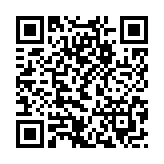
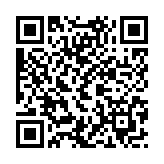
Other systems use a QR-code-based connection. When scanned using a standard camera app, the QR code does not provide any usable data because it links to an Auracast broadcast rather than a file (such as a video, JPEG, or PDF). Instead, users must scan the QR code within their hearing aid app, which automatically connects them to the broadcast. Phonak hearing aids use this method.
Worship + Message
Speech Only
FAQs
Who can use it?
People with compatible hearing aids, cochlear implants, earbuds, headphones, or dedicated Auracast receivers. A Bluetooth connection alone does not guarantee Auracast compatibility.
How do I connect?
Depending on the device, attendees may select the church's broadcast from their device settings, use a companion app, scan a QR code, or use a dedicated receiver. The exact steps depend on the installed system and the listener's device(s).
Will it help me hear the pastor better?
It may. The system can deliver the sound system's audio directly to your listening device, reducing the effect of distance and room reverberation. Your hearing needs, device settings, and the quality of the church's audio feed will affect the benefit.
Is this just for people with hearing loss?
No. Anyone with compatible equipment may listen, including someone who struggles to understand speech in a large or reverberant room.
Do I have to pay to use it?
North does not charge to use the broadcasts. Auracast itself does not require a subscription, although a listener might need to purchase compatible equipment.
Can lots of people use it at once?
Yes. Auracast broadcasts can be received by many compatible devices simultaneously without the transmitter needing an individual connection to each listener.
Will it work anywhere in the church?
It works within the system's effective coverage area, which extends throughout the Worship Center and into the Welcome Center. Broadcasts cannot be effectively used outside of the church or on another floor.
Will I still hear the people around me?
It depends on your device and listening settings. Your hearing aids may be able to mix the broadcast with microphone input, but some configurations may emphasize the broadcast and reduce awareness of nearby voices. You may need to adjust your program or volume. Your audiologist can help you determine the appropriate mixing ratios for your devices. These can often be changed in your device app on a mobile phone.
Can I use it with my phone?
Some phones can help you find and join Auracast broadcasts, but not every phone supports the necessary features. A compatible phone may act as the connection assistant rather than being the device that actually plays the sound.
Does it replace hearing aids?
No. Auracast is an assistive listening option, not a replacement for hearing aids or a hearing evaluation. It can complement hearing aids or provide another way to listen through compatible equipment.
Do I need new hearing aids?
Not necessarily. Some existing hearing aids may support Auracast through a firmware update or compatible accessory; others may not support it at all. The specific make, model, and sometimes firmware version matter. Check with your audiologist to find out if your devices are compatible or contact:
Audiology Services of West Virginia
2012 Garfield Avenue, Suite 4
Parkersburg, WV 26101
304-428-2403